torstai 16. toukokuuta 2013

Hydra and Packaged Firefox OS Web Apps

Hydra widget platform (PRO) 1.3.7 has now been available for a few weeks and a major issue has risen with the Firefox OS compatibly. As you may know by now, Firefox OS supports two kinds of deployment mechanisms for it's web applications, called hosted and packaged. Usually applications are distributed in the hosted format, but apps that require a certain level of device access can only be deployed in the packaged format, which is in many ways similar to W3C's widget packaging format. While Hydra supports both of these formats, it is currently only possible to install hosted applications from the Firefox Marketplace.

When I originally developed the support for Firefox OS web apps, packaged applications could be installed without any issues. But it seems that since then the Marketplace has changed the way it detects what kind of device is used to view it's content. The reason they have done this change is to properly detect Android devices and block packaged apps from being available (hosted web apps can be installed on Android using Firefox Aurora).

To make up for this inconvenience, I'll shortly release an updated version of Hydra and the Marketplace widget that the Marketplace once again recognizes as a genuine Firefox OS device. In addition to that, packaged applications are getting support for automatic update detection (see the teaser below).

Updates will be indicated in the Hydra manager app and device notifications area.

Updates will be fully supported for packaged Firefox OS web apps.

tiistai 19. maaliskuuta 2013

Mozilla web apps

Today I will demonstrate the simple steps required to install Mozilla web apps on your N9. To begin, you will need Hydra WRT installed (at least version 1.3.7 that will be released in the near future - hang in there for a while longer!).

Step 1. The first step is to install the Firefox Marketplace shortcut widget. You can do this by opening the Hydra management application ("Web apps" in the launcher), then selecting the paper clip icon in the toolbar. From the shown list, pick Firefox Marketplace and hit the Install button (as shown in the screenshot below). After this, details of the Marketplace widget are shown and you must confirm the installation.
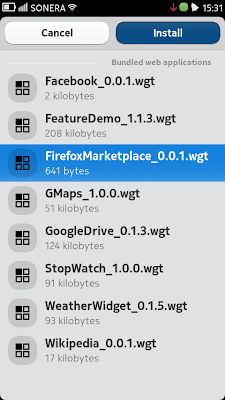
Step 1 - Installing Firefox Marketplace widget
Step 2. When the installation is complete (it really only takes a second), you can use the normal web interface of the Firefox OS Marketplace to browse it's content. Please note that you the system's default browser is not compatible with the Marketplace and the installed shortcut widget must be used to browse and install new content from the store (a "Marketplace" shortcut is created in the application launcher view during installation). To install an item from the store, simply hit the blue colored "Free" button shown on app details view. The button's text will change into a progress spinner (as shown in the screenshot below) and soon an installation confirmation view will be shown.
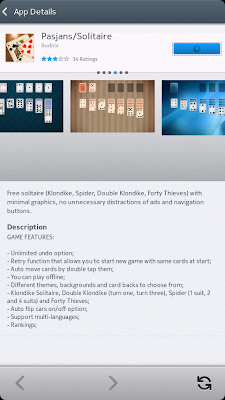
Step 2 - Installing content from the Marketplace

Step 3. After installing a web app, you can find a shortcut to launch it from the system's regular application launcher view. Enjoy.
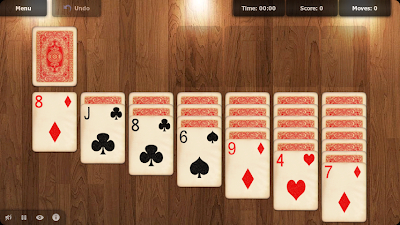
Step 3 - Running the apps

Known issues and limitations:

  • Only a few web app permission requests are recognized, for any apps requesting Firefox OS specific APIs the installation will simply fail
  • Apps requiring geolocation are allowed to be installed, but geolocation is not actually provided
  • Marketplace widget shows some minor graphical errors
  • Marketplace widget crashes randomly (appears to be a webkit issue - actual installation is done by another process so there is no risk of corrupting any files)
  • Marketplace sometimes returns corrupted app manifest, which will cause the installation to fail (Marketplace bug, though it seems possible to create a work-around for this)
  • Some unsupported web app management APIs such as uninstall, check for updates, request app details and request apps installed from same origin
  • App details returned by the JavaScript API after successfully installing a web app contain a timestamp that is (slightly) different from timestamp stored to disk by Hydra
  • HTML5 offline cache and web storage are not supported (yet) 


My top-3 web app recommendations so far:

lauantai 9. maaliskuuta 2013

Next frontier in web applications

Just wanted to give you a bit of a teaser for a very special upcoming new feature for Hydra WRT. In a few weeks (a bit longer for non-pro version users),  I'm going to release a version with an experimental support for Firefox OS web apps. The nice thing about Firefox OS platform is that there is already an app store with some content available at https://marketplace.firefox.com/ and I will also be releasing a web application that makes it possible to install apps directly from the store.
Firefox marketplace app details view on N9

Installed Twitter web app running on N9

lauantai 2. helmikuuta 2013

To become PRO

As most of you already know, the Hydra widget platform is currently supporting most of the available widgets implemented for the major widget platforms in mobile market, including Tizen, Symbian WRT, Opera widgets, Samsung widgets and any generic W3C widgets. In addition, Hydra supports loads of widget functionality defined by Apache Cordova and Wholesale Applications Community projects.

I'm continuously working to improve compatibility with all the specifications and APIs released by W3C, Cordova and WAC. In the future, there might even be a port of the software to other platforms, especially the promising MeeGo continuation provided by Jolla in form of Sailfish OS. I'm also considering open sourcing the application at a later time.

If you want to support this continuous effort, there is now an opportunity to purchase a professional version of the Hydra widget platform. All contributions are highly appreciated. For the money, You get all the features from the free versions, as well as getting the latest new features and improvements before the users of the free version do. In addition, the PRO version automatically encrypts all installed widgets and their data to provide top level security.

The first available PRO version is based on Hydra 1.3.5 and contains the following changes:

  • New widget that enables access to files stored on Google Drive
  • Added cookie support for embedded webviews (WAC extension)
  • Separated shortcut widgets to their own category in the manager app
  • Modified automatic update checking only happen when there is a network connection instead of prompting for one
  • Several bug fixes
Please note that installing widgets with the PRO version is slightly slower due to the encryption. When installing big widget packages, the system might say "Not responding", but the installation will finish successfully in a few seconds. I'm working on providing a nicer installation flow for the next version.

perjantai 26. lokakuuta 2012

Project Hydra

First snow fell from the sky today here in Helsinki and to celebrate that I decided to write a status update. From now on, the Widget runtime for MeeGo will be called Hydra widget platform and should no longer be considered a beta. It's a name that I feel symbolizes well the purpose of the project, which is to create a widget runtime capable of running web applications created for any mobile web runtime, all in one environment. Just like the beast of same name has many heads, the widget platform shall support many web standards and platforms.

Version 1.3 is almost ready at the moment, just running some final tests before releasing it. Main improvement on the runtime side is integrating Cordova core functionality and APIs to the list of supported features. Cordova (previously known as PhoneGap) is an extremely popular HTML5-based open source cross-platform application development tool that offers developers a rich set of device APIs and the ability to embed a web application into a native application package for distribution over app stores. This means that a single Cordova application is basically just another widget. There is even a handy cloud service called PhoneGap Build that lets a developer convert a web application using W3C standard packaging format with a few extensions into native packages. From version 1.3 forward Hydra will support the Cordova APIs and packaging extensions, so that you can use Cordova applications even without converting them to native packages. Version 1.3 will contain Cordova 2.1 MeeGo port with the exception of File and Contacts APIs, which will be supported later once I figure out how to make them secure.

Update 30.10.2012: Version 1.3 is now out! You can get it from http://store.ovi.com/content/302071. Here is the full changelog:
  • Implemented support for Cordova 2.1.0 core and plugins (excluding file and contacts API)
  • Fixed Cordova Camera plugin to work with DATA_URI destination type
  • Fixed Cordova Acceleration plugin to return timestamp in ms instead of micro seconds
  • Implemented simple caching support for wiget preferences to preserve IO
  • Implemented support for widget.onExit event
  • Changed application name
  • Improved widget update support by no longer 'downloading' local update description files
  • Added system notification for discovered widget updates
  • Added support to enable fullscreen mode via preference 'fullscreen' with value 'true'
  • Added support to control orientation via preference 'orientation'
  • Changed default view-mode (i.e. 'maximized') to no longer show application toolbar
  • Widget information dialog now shows if widget update is supported
  • Rewrote geolocation handling
  • Fixed some vertically pannable widgets allowing slight horizontal pan
  • Improved GMaps widget with Street View and Places search support as well us graphical presentation of location accuracy
  • Fixed Feature Demo Geolocation page getting stuck
  • Updated Feature Demo widget with Cordova examples
  • Added vibration support for StopWatch widget

New application icon.

After updating to 1.3, you should automatically see updated versions of the bundled widgets offered to you as updates on the manager app. If you don't see the available updates, that means that you are using really old version of the widgets and should update them manually (selecting the attachment icon from toolbar and selecting each of the widgets). Please also notice that the Google Maps widget may randomly crash due to an issue in the platform components and unfortunately there seems to be nothing I can do to fix this issue.

lauantai 29. syyskuuta 2012

Top-3 Opera widget games on N9

Besides the Tizen games that are obviously created for touch screens, it gets a bit harder to find the smartphone and touchscreen friendly games from Opera widgets. I went through some of the available games and here are a best three games that I discovered.

1. Bubbles (http://widgets.opera.com/widget/10982/)

Very addictive game that also happens to work great on the new 1.2.1 version of Widget runtime. Keeps track of your high score so that you can compete against your previous best. Only annoyance is that if you change the orientation, the game resets itself. Also, the game will be shown as live icon in widget manager even though it is not playable in that mode.


2. Game FiFteen (http://widgets.opera.com/widget/27001/)

A classic mechanical puzzle game with 15 movable numbers to sort on a grid of 16 spaces. Works great on portrait mode.


3. Tic Tac Toe (http://widgets.opera.com/widget/6608/)

A clear and simple game of noughts and crosses. Works best in portrait mode.